> ## Documentation Index
> Fetch the complete documentation index at: https://docs.lerian.studio/llms.txt
> Use this file to discover all available pages before exploring further.
# Accounting rules
> Set up Accounting Routes that decide which accounts can take part in each transaction type and how the entries are posted.
The **Accounting** section is where you define the rules that every transaction must follow before it touches the ledger.
You do this through **Accounting Routes**. An Accounting Route is a named, reusable rule for one kind of transaction (for example, *Pix transfer*, *card purchase*, or *fee charge*) that answers three operator questions:
* Which accounts are allowed on the source side?
* Which accounts are allowed on the destination side?
* Which debit and credit entries should be posted when the transaction runs?
**Example.** A `Pix transfer` route can require the source to be a `customer` account and the destination to be a `merchant` account, then post a direct debit-and-credit entry between them. When someone creates a Pix transaction in Midaz, the route is what validates the accounts and writes the entries.
Set Accounting Routes up after you have the main accounts and account types in place — routes are easier to model when you already know which accounts represent customers, treasury, fees, settlement, revenue, and expenses.
## How the pieces fit together
***
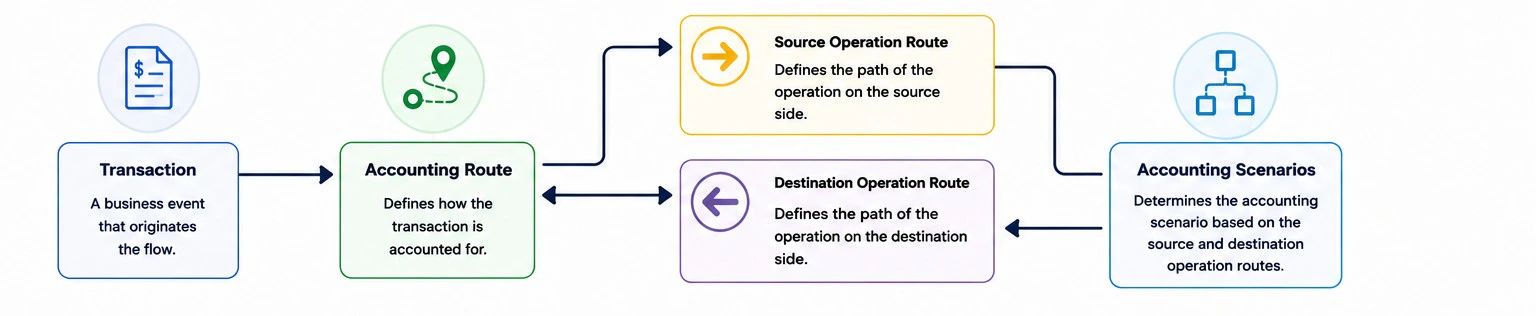 | Piece | What it controls | Example |
| ------------------- | ------------------------------------------------------------------------ | --------------------------------------------------------- |
| Accounting Route | The transaction-level route that groups the operation rules. | `Pix transfer route` |
| Operation Route | The account side and validation rule. | `Source must be customer`, `Destination must be merchant` |
| Validation rule | How Midaz decides whether an account can be used. | Account Type `customer` or alias `@treasury_main` |
| Accounting scenario | Which debit and credit entries are posted for the transaction lifecycle. | Direct, Two-Step, Reversal, Overdraft |
## Choosing the operation type
***
Use **Source** for accounts where value originates.
Example: a customer account can send funds in a payment flow.
Use **Destination** for accounts where value lands.
Example: a merchant account can receive funds in a payment flow.
Use **Bidirectional** when the same account class can send and receive.
Example: checking accounts can transfer value to other checking accounts.
A route must have at least one Source and one Destination operation route, or one Bidirectional operation route.
## Choosing the validation rule
***
| Validation type | Use when | Example |
| ---------------- | --------------------------------------------------------------------- | -------------------------------- |
| Account Type | Any account in a class should be valid. | Any `customer` account can send. |
| Alias | Only one exact account should be valid. | Only `@treasury_main` can send. |
| Empty validation | You intentionally do not want account validation at this route level. | Rare; use carefully. |
Use Account Type validation for scalable flows. Use alias validation for fixed operational accounts, such as treasury, fee, settlement, or suspense accounts.
## Common route patterns
***
### Customer to merchant
Use separate Source and Destination routes when each side has a different role.
| Operation route | Validation |
| --------------- | ----------------------- |
| Source | Account Type `customer` |
| Destination | Account Type `merchant` |
### Peer-to-peer transfer
Use a Bidirectional route when the same account type can be both source and destination.
| Operation route | Validation |
| --------------- | ----------------------- |
| Bidirectional | Account Type `customer` |
### Fee collection
Use a Destination route with alias validation when fees must always land in one operational account.
| Operation route | Validation |
| --------------- | ----------------------- |
| Source | Account Type `customer` |
| Destination | Alias `@fee_revenue` |
## Accounting scenarios
***
| Scenario | Use when | What the user configures |
| -------------------- | ------------------------------------------------------------------------------- | -------------------------------------------------------------------- |
| Direct Transaction | The movement is executed in one step. | Debit and credit entries for immediate posting. |
| Two-Step Transaction | The movement has hold, commit, and cancel phases. | Entries for reservation, confirmation, and cancellation. |
| Reversal | A completed transaction may need to be reversed. | Debit and credit entries for the reversal event. |
| Overdraft | A debit may exceed the account's available funds, drawing on an overdraft line. | Debit and credit entries for the overdraft draw and later repayment. |
Do not enable route validation in Ledger settings until the required routes exist. If route validation is enabled without matching routes, transactions will fail validation.
## Available pages
***
A step-by-step, Console-first guide to building your accounting model — from chart of accounts to a working Pix payment, no API calls required.
Configure accounting routes with operation rules and accounting scenarios in a unified wizard.
| Piece | What it controls | Example |
| ------------------- | ------------------------------------------------------------------------ | --------------------------------------------------------- |
| Accounting Route | The transaction-level route that groups the operation rules. | `Pix transfer route` |
| Operation Route | The account side and validation rule. | `Source must be customer`, `Destination must be merchant` |
| Validation rule | How Midaz decides whether an account can be used. | Account Type `customer` or alias `@treasury_main` |
| Accounting scenario | Which debit and credit entries are posted for the transaction lifecycle. | Direct, Two-Step, Reversal, Overdraft |
## Choosing the operation type
***
Use **Source** for accounts where value originates.
Example: a customer account can send funds in a payment flow.
Use **Destination** for accounts where value lands.
Example: a merchant account can receive funds in a payment flow.
Use **Bidirectional** when the same account class can send and receive.
Example: checking accounts can transfer value to other checking accounts.
A route must have at least one Source and one Destination operation route, or one Bidirectional operation route.
## Choosing the validation rule
***
| Validation type | Use when | Example |
| ---------------- | --------------------------------------------------------------------- | -------------------------------- |
| Account Type | Any account in a class should be valid. | Any `customer` account can send. |
| Alias | Only one exact account should be valid. | Only `@treasury_main` can send. |
| Empty validation | You intentionally do not want account validation at this route level. | Rare; use carefully. |
Use Account Type validation for scalable flows. Use alias validation for fixed operational accounts, such as treasury, fee, settlement, or suspense accounts.
## Common route patterns
***
### Customer to merchant
Use separate Source and Destination routes when each side has a different role.
| Operation route | Validation |
| --------------- | ----------------------- |
| Source | Account Type `customer` |
| Destination | Account Type `merchant` |
### Peer-to-peer transfer
Use a Bidirectional route when the same account type can be both source and destination.
| Operation route | Validation |
| --------------- | ----------------------- |
| Bidirectional | Account Type `customer` |
### Fee collection
Use a Destination route with alias validation when fees must always land in one operational account.
| Operation route | Validation |
| --------------- | ----------------------- |
| Source | Account Type `customer` |
| Destination | Alias `@fee_revenue` |
## Accounting scenarios
***
| Scenario | Use when | What the user configures |
| -------------------- | ------------------------------------------------------------------------------- | -------------------------------------------------------------------- |
| Direct Transaction | The movement is executed in one step. | Debit and credit entries for immediate posting. |
| Two-Step Transaction | The movement has hold, commit, and cancel phases. | Entries for reservation, confirmation, and cancellation. |
| Reversal | A completed transaction may need to be reversed. | Debit and credit entries for the reversal event. |
| Overdraft | A debit may exceed the account's available funds, drawing on an overdraft line. | Debit and credit entries for the overdraft draw and later repayment. |
Do not enable route validation in Ledger settings until the required routes exist. If route validation is enabled without matching routes, transactions will fail validation.
## Available pages
***
A step-by-step, Console-first guide to building your accounting model — from chart of accounts to a working Pix payment, no API calls required.
Configure accounting routes with operation rules and accounting scenarios in a unified wizard.