

Accounting Routes answer three operational questions:Documentation Index
Fetch the complete documentation index at: https://docs.lerian.studio/llms.txt
Use this file to discover all available pages before exploring further.
- Which type of transaction is being configured?
- Which accounts are allowed to participate?
- Which accounting entries should be recorded when the transaction runs?
How the pieces fit together
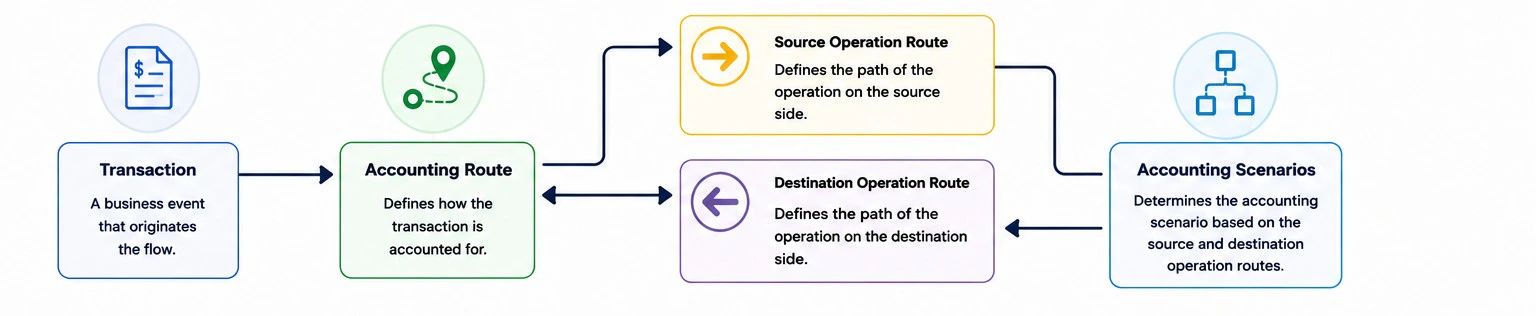
| Piece | What it controls | Example |
|---|---|---|
| Accounting Route | The transaction-level route that groups the operation rules. | Pix transfer route |
| Operation Route | The account side and validation rule. | Source must be customer, Destination must be merchant |
| Validation rule | How Midaz decides whether an account can be used. | Account Type customer or alias @treasury_main |
| Accounting scenario | Which debit and credit entries are posted for the transaction lifecycle. | Direct, Two-Step, Reversal |
Choosing the operation type
Use Source when the rule applies only to the sending side
Use Source when the rule applies only to the sending side
Use Source for accounts where value originates.Example: a customer account can send funds in a payment flow.
Use Destination when the rule applies only to the receiving side
Use Destination when the rule applies only to the receiving side
Use Destination for accounts where value lands.Example: a merchant account can receive funds in a payment flow.
Use Bidirectional when the same rule applies to both sides
Use Bidirectional when the same rule applies to both sides
Use Bidirectional when the same account class can send and receive.Example: checking accounts can transfer value to other checking accounts.
A route must have at least one Source and one Destination operation route, or one Bidirectional operation route.
Choosing the validation rule
| Validation type | Use when | Example |
|---|---|---|
| Account Type | Any account in a class should be valid. | Any customer account can send. |
| Alias | Only one exact account should be valid. | Only @treasury_main can send. |
| Empty validation | You intentionally do not want account validation at this route level. | Rare; use carefully. |
Common route patterns
Customer to merchant
Use separate Source and Destination routes when each side has a different role.| Operation route | Validation |
|---|---|
| Source | Account Type customer |
| Destination | Account Type merchant |
Peer-to-peer transfer
Use a Bidirectional route when the same account type can be both source and destination.| Operation route | Validation |
|---|---|
| Bidirectional | Account Type customer |
Fee collection
Use a Destination route with alias validation when fees must always land in one operational account.| Operation route | Validation |
|---|---|
| Source | Account Type customer |
| Destination | Alias @fee_revenue |
Accounting scenarios
| Scenario | Use when | What the user configures |
|---|---|---|
| Direct Transaction | The movement is executed in one step. | Debit and credit entries for immediate posting. |
| Two-Step Transaction | The movement has hold, commit, and cancel phases. | Entries for reservation, confirmation, and cancellation. |
| Reversal | A completed transaction may need to be reversed. | Debit and credit entries for the reversal event. |
What to do next
After the route model is clear, create it in Creating an Accounting Route.
Create Transaction Route
Create the transaction-level route via API.
Create Operation Route
Create operation-level routing rules via API.