

Source-available and versioned with Midaz
CRM is source available, does not require a license, and is maintained in the same repository as Midaz. Its version always matches the Midaz Core version (for example, Midaz
v3.5.0 → CRM v3.5.0).
Although versioned together, CRM is deployed independently and can be enabled or omitted depending on your use case.
Why use the CRM?
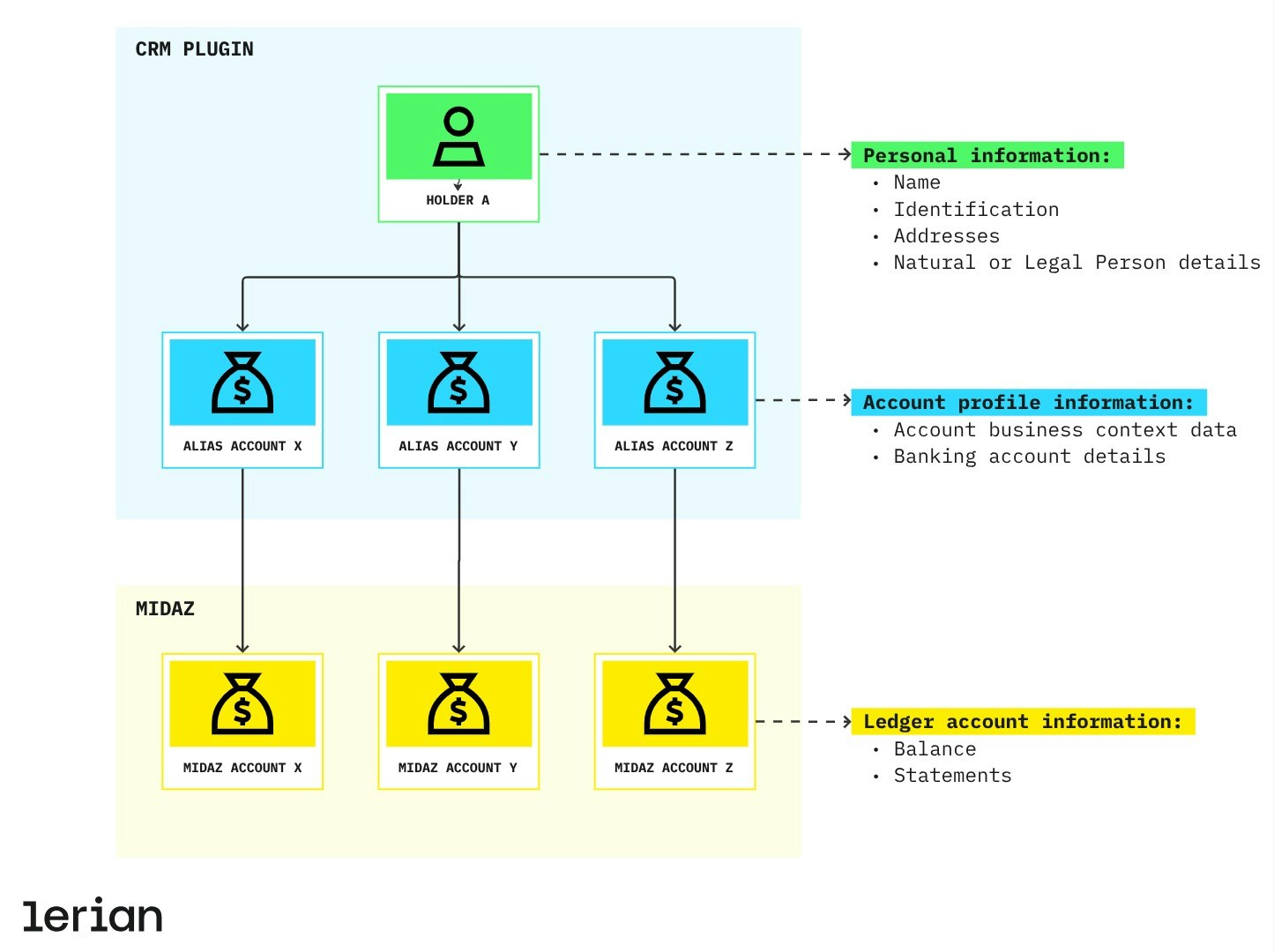
Midaz ledger accounts are generic by design, built to be transaction-first and domain-agnostic. CRM steps in to add meaning to those accounts, linking each one to detailed user profiles and business contexts. Because it is optional and independently deployable, CRM can be adopted incrementally—only when your use case requires customer or business metadata beyond the ledger.
Example use cases
- Banking (individuals and businesses): CRM stores identifiers like CPF or CNPJ, address, contact details, or account numbers, while Midaz handles the exact same transaction logic for either customer type.
- Supply chains (supplier, factory, retailer): CRM tracks metadata like supplier IDs, warehouse locations, or contractual information. This data does not belong in the transaction itself, but is essential for business decisions.
Entities
CRM revolves around two core entities:
- Holder – The core entity in CRM, representing the persona associated with a ledger account on Midaz. It stores identity-related attributes and individual characteristics.
- Alias Account – Defines the business context associated with a Ledger Account in Midaz Ledger, including financial details such as bank account information.
Design principles
CRM is built for:
- Separation of concerns: Keeps user profile data out of transactional logic.
- System performance: No user-level orchestration inside Midaz core services.
- Deployment flexibility: Can be enabled, scaled, or omitted independently from the ledger.
- Clear domain boundaries: Evolves alongside Midaz without coupling to ledger internals.
CRM doesn’t validate ledger-level rules or compliance processes like KYC. It’s a neutral, persistent data layer designed for maximum interoperability.
API behavior
CRM is implemented as a standalone registry API. It provides persistence and structured access to non-transactional data linked to accounts on Midaz.
- It does not enforce validations such as user status, risk profile, or document verification.
- It is agnostic to the asset, ledger, or grouping logic used in Midaz accounts.
- It ensures consistent access to holder metadata without polluting the transactional layer.
Security & compliance
Lerian provides Midaz and its plugins as on-premise components—meaning you stay in control of your infrastructure, compliance policies, and user data lifecycle. Even though CRM is source available and license-free, it follows the same security standards as the rest of the Midaz platform:
- Data in transit is encrypted using industry-standard protocols.
- Data at rest is protected through encryption and fine-grained access controls.
Encryption key management is the customer’s responsibility. We strongly recommend using secret management services to store, rotate, and control access to keys.
Data deletion strategies
At Lerian, we treat data ownership seriously. That’s why CRM gives you full control over how information is removed, with two built-in options:
- Soft delete (default): The record stays in the database but is flagged as deleted. This is useful if you need to keep an audit trail or recover information later.
- Hard delete: If your internal policy requires complete removal, you can use a specific command to delete the data permanently—no recovery.
Access control
Need to restrict who can access your CRM data? You can enable our Access Manager to help you restrict who has access to the data.
Enabling Access Manager
To enable access control, first make sure Access Manager is installed. Then, open the.env file located in the root of the CRM folder using any text editor, and set the following environment variables:
Next steps
Core concepts
Understand the key entities managed by CRM: Holders and Alias Accounts.
Explore the CRM API
Browse endpoints for holders, alias accounts, and related parties.
Using CRM
Learn how to register holders and link them to ledger accounts.