

What the plugin handles for you
- Sends outgoing TEDs to any Brazilian bank (TED OUT)
- Receives and credits incoming TEDs automatically (TED IN)
- Processes instant internal transfers between accounts (P2P)
- Calculates and applies fees automatically before the customer confirms
- Detects and prevents duplicate transfers within a configurable window
- Validates BACEN business days against the
bacen_holidayscalendar (static seed for 2026–2028; live ANBIMA refresher pending) - Signs messages with your institution’s digital certificate, as required by BACEN
- Retries failed operations automatically
- Notifies your system via webhooks in real time on every status change
How TED OUT works
TED OUT uses a two-step flow so the customer can review the fee before confirming.
Step 1 — Initiate
The initiation is valid for 24 hours. If the customer doesn’t confirm within that window, it expires automatically.
Step 2 — Process
How TED IN works
- An external bank sends a TED to your institution via JD Consultores.
- The plugin polls JD every 60 seconds (default) to detect new incoming transfers.
- The plugin validates the recipient against the CRM to find the correct account.
- The plugin credits the account in Midaz and creates a completed transfer record.
- Your system receives a webhook confirming the credit.
TED IN receiving is disabled by default. Enable it per organization via the Admin API once your JD credentials and polling worker are configured.
How P2P works
P2P transfers move funds between two accounts within the same organization, without going through the SPB network. Settlement is instant.
- Your system calls the plugin with sender account, recipient account, and amount.
- The plugin calculates the fee (if configured) and presents it for confirmation.
- Upon confirmation, the plugin executes the transfer in Midaz.
- Both accounts are updated immediately. Your system receives a webhook.
Deployment models
The TED plugin supports two deployment models, defined through the
DEPLOYMENT_MODE environment variable.
SaaS (managed by Lerian)
In SaaS deployments, Lerian manages the integration with JD Consultores, including credential management and certificate maintenance. Your team only needs to configure business-level settings, such as transaction limits, fees, and webhooks, through the Admin API. No infrastructure or connection management is required. When running insaas mode, the plugin operates as a multi-tenant service. Tenant identity, JD credentials, webhook secrets, and selected configuration settings are dynamically resolved through the multi-tenancy platform service. In this mode, the MULTI_TENANT_* variables and AWS_REGION are required and actively used by the plugin.
BYOC (bring your own credentials)
In BYOC deployments, your institution is responsible for providing JD Consultores credentials and the RSA private key used to sign messages. These values are configured by your DevOps team through environment variables, giving you full control over the JD connection and allowing the plugin to run entirely within your own infrastructure. This is the default deployment mode (byoc). All configuration — including JD credentials, webhook secrets, and fee-related settings — is loaded from environment variables during application startup.
Organization resolution
In single-tenant deployments, the Midaz organization is identified through the requiredX-Organization-Id header on organization-scoped API routes.
For background processes that do not receive request headers, such as the TED IN poller and reconciliation workers, the plugin falls back to the ORGANIZATION_ID environment variable.
Variables related to multi-tenancy (
MULTI_TENANT_*) and AWS_REGION are ignored when the plugin is running in byoc mode.Integration with Midaz
All financial movements go through the Midaz ledger. The plugin creates transactions in Midaz for every transfer:
- TED OUT — funds are held when the transfer is confirmed (process step, via
pending: true), then debited upon settlement confirmation. - TED IN — funds are credited after the transfer is validated and confirmed by JD.
- P2P — a single Midaz transaction debits the sender and credits the recipient atomically.
For developers
Architecture
The plugin uses Hexagonal (Ports and Adapters) architecture combined with CQRS. Business logic is isolated from infrastructure, making it straightforward to add new adapters (e.g., a different SPB provider) without changing core behavior.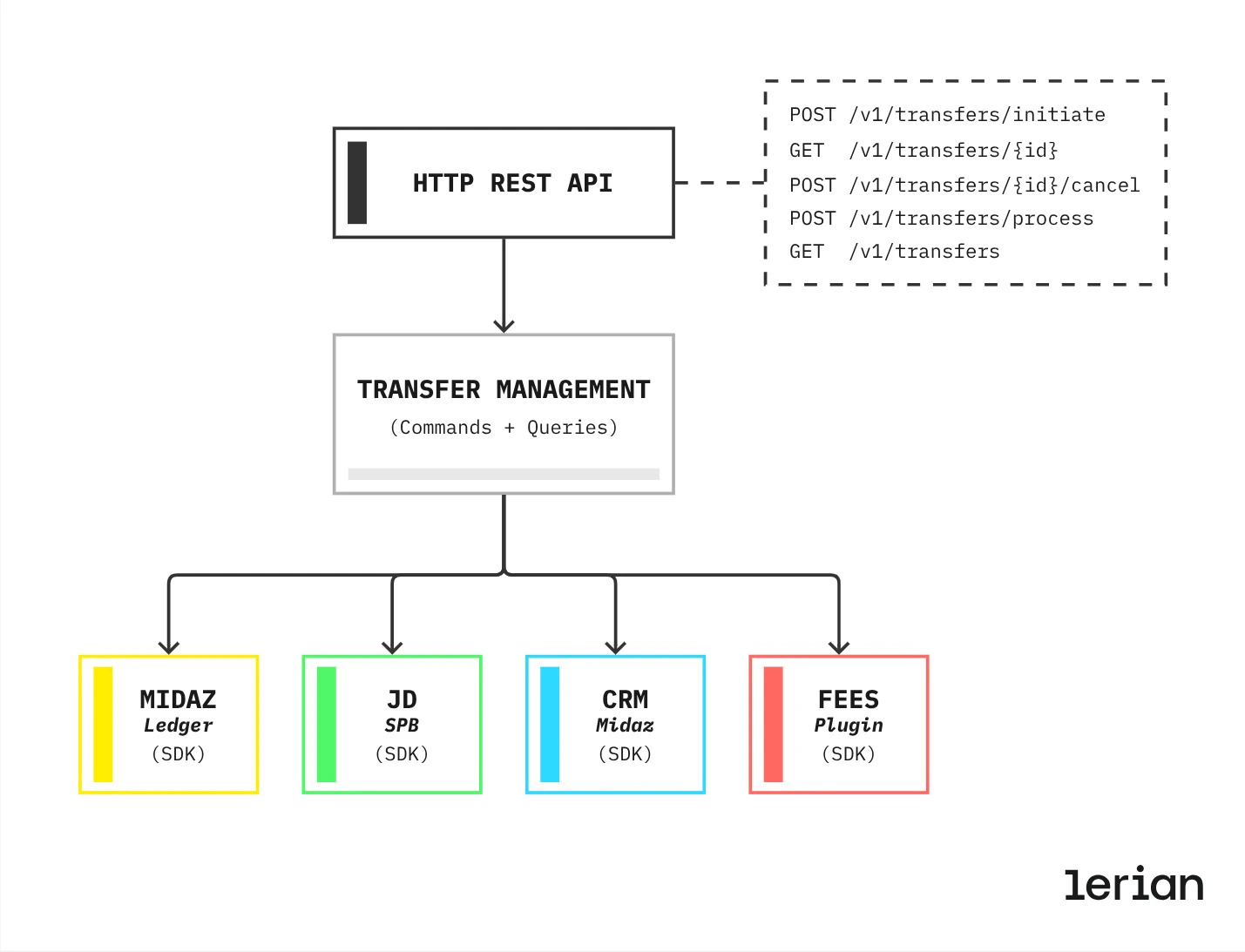
Duplicate detection
The plugin generates a duplicate-detection fingerprint fromsenderAccountId, the recipient details (ISPB, branch, account, holder document), the amount, and the purpose, and stores it in Redis with a configurable TTL (default: 300 seconds via DUPLICATE_GUARD_TTL_SEC). The organization is not part of the fingerprint; tenant isolation comes from the Redis key prefix. Duplicate requests within the window are rejected with 409 Conflict and error code BTF-0012.
Multi-tenant data isolation
Tenant isolation comes from multi-tenancy platform database resolution. ThetenantId is extracted from the JWT claim or authenticated context and is never supplied through X-Organization-Id. Redis cache uses per-tenant key prefixes (tenant:{tenantId}:{key}), and business tables use Midaz organization fields only for business-scope authorization inside the resolved tenant.