

What DICT does
DICT is the backbone of Pix’s usability and security. It provides:
Addressing
Maps each Pix key to a specific transactional account.Uniqueness
Prevents duplicate registrations across the entire Brazilian financial system.Portability
Allows users to move their keys between institutions without changing the identifier.Ownership integrity
Supports dispute flows when a key is incorrectly linked to the wrong user.Regulated lookup
Institutions can securely fetch recipient information before processing a transfer. DICT ensures Pix remains simple for users and interoperable for institutions.Key types
Pix keys are unique identifiers that link a user’s bank account to the Pix payment system. They allow others to send or receive instant payments without needing full account details, using an alias such as a CPF, email, phone number, or random key (EVP). BACEN defines four official key types:
1. CPF / CNPJ (Registration Number / Tax Identifier)
What it is:
Uses the customer’s official tax identification number (CPF for individuals, CNPJ for businesses) as the Pix key.Format:
- CPF: 11 digits → 12345678901
- CNPJ: 14 digits → 12345678000195
Characteristics:
- No confirmation required
- One key per document
- Easily identifiable but exposes personal data
Validation:
- Must match the account owner’s legal document
- Follows BACEN validation algorithms
2. Email
What it is:
Links a valid email address to the customer’s Pix account.Format:
- Up to 77 characters
- Follows standard format → user@domain.com
- Case-insensitive
Characteristics:
- Requires token confirmation sent to the email
- Easy to share and remember
- Does not expose personal data
Registration flow:
- Customer requests key creation via /dict
- Plugin sends token to the provided email
- Customer confirms token
- Key becomes active in DICT
Validation:
- Must be confirmed within 5 calendar days
- Token is unique per request
Best for:
- Freelancers or professionals (e.g., payments@studio.com)
- Companies managing multiple emails
3. Phone number
What it is:
Uses a mobile number as a Pix key, registered in international format.Format:
- E.164 international standard → +5511987654321
- +55 (country) + area code + number
Characteristics:
- Confirmation required via SMS token
- Widely recognized and easy to use
- Doesn’t expose personal data
Rules:
- Only mobile phones accepted (no landlines)
- Must be confirmed within 5 calendar days
- Can register multiple numbers per account
Common use cases:
- Small business owners or service providers
- Customers who prefer simplicity (“Pix to my phone number”)
4. Random key (EVP)
What it is:
A system-generated unique identifier (UUID v4), ensuring maximum privacy.Format:
123e4567-e89b-12d3-a456-426614174000Characteristics:
- No confirmation required
- Does not reveal any personal or business data
- Can be created instantly
- Hard to memorize manually
When to use:
- Privacy-focused users
- Large companies or franchises needing separate receiving accounts
- One-off or temporary payment flows
Rules:
- Generated automatically by the Pix Plugin
- Unique and non-reusable
- Up to five keys total per account, including all types (BACEN regulation)
Key limits and rules (BACEN Regulation)
| Type | Limit |
|---|---|
| Total Pix keys per account | 5 |
| CPF / CNPJ | 1 per account |
| Phone | 1 per number |
| 1 per address | |
| EVP | Unlimited, within the 5-key limit |
Key lifecycle
A Pix key follows a standardized lifecycle defined by BACEN, ensuring consistency, security, and interoperability across all participating institutions.
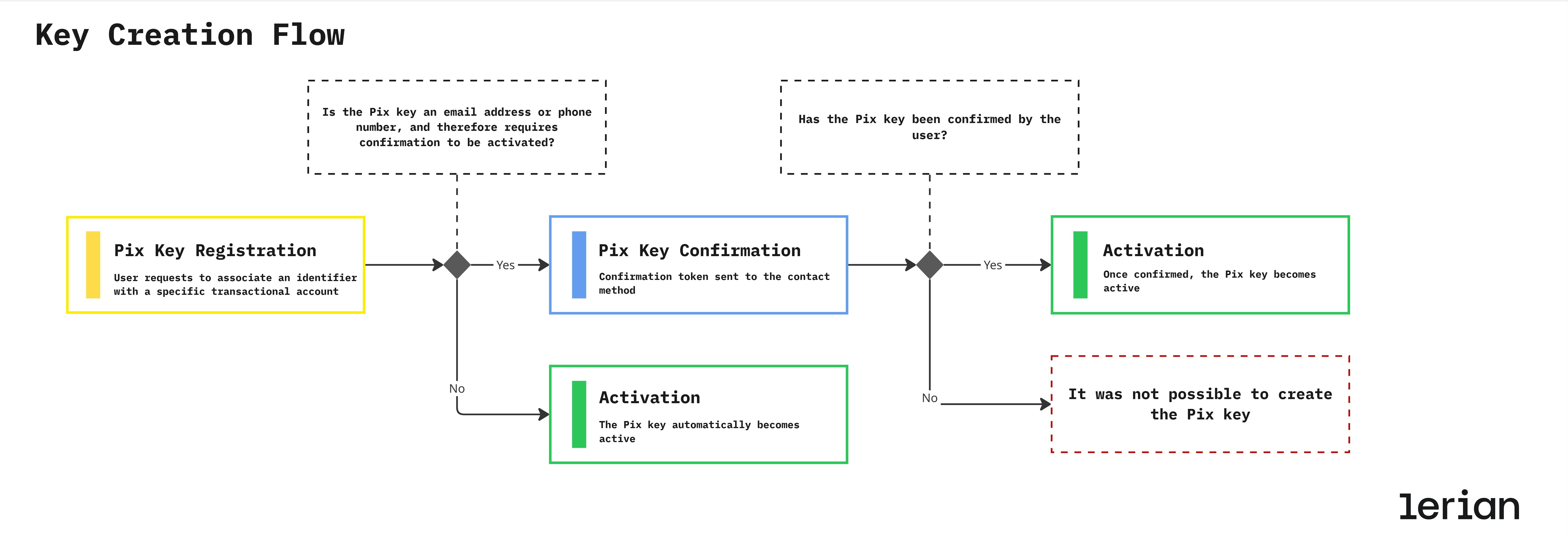
1. Registration
A Pix key is registered when a user or institution requests to associate an identifier (such as a CPF, email, phone number, or random key) with a specific transactional account. At this stage, the key is created in a pending state, awaiting validation according to its type.2. Confirmation
Some Pix keys require explicit confirmation to prove ownership before becoming active:- Email / Phone number → Confirmation token sent to the contact method
- CPF / CNPJ → Automatically validated and confirmed
- EVP (Random key) → Automatically generated and confirmed
3. Activation
Once confirmed, the Pix key becomes active. At this point, it can be:- Discovered via DICT lookups
- Used to receive Pix transfers
- Referenced by QR Codes and payment flows
4. Update
Certain changes — such as modifying the linked account or ownership details — may require new validations or confirmations, depending on the key type and the nature of the update.5. Removal
A Pix key can be removed either:- By the user (voluntary removal), or
- By the institution (compliance, account closure, or regulatory reasons)
6. Synchronization
Institutions must continuously synchronize their local state with the BACEN DICT. This guarantees that:- Key status remains consistent across the ecosystem
- Portability and ownership claims are reflected correctly
- No outdated or invalid keys remain active
Portability & Ownership claims
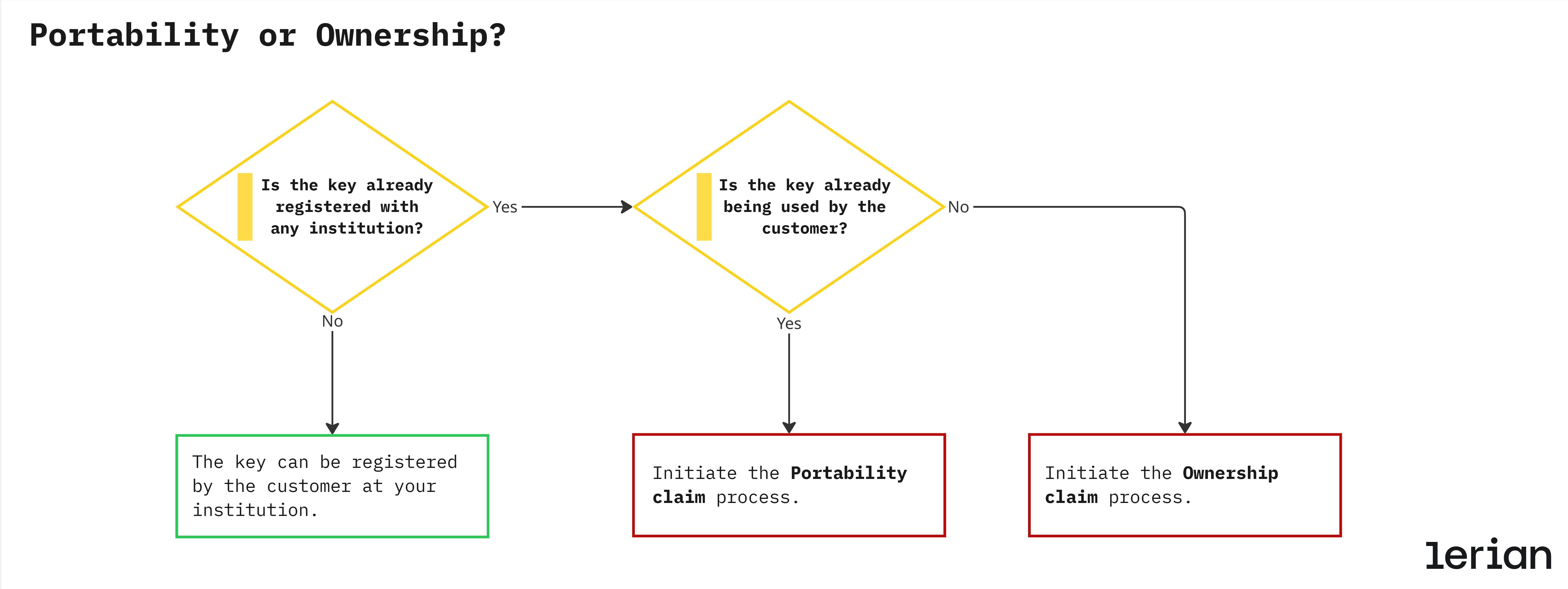
Pix key claims are official requests registered in the BACEN DICT to modify the ownership or association of a Pix key. They ensure that every key — whether phone, email, CPF, or CNPJ — remains correctly linked to its legitimate owner and financial institution. The Pix Plugin automates the entire claim process — from request initiation to confirmation — ensuring secure ownership validation, institutional interoperability, and full traceability in compliance with the BACEN DICT standard.
Claim types
In the Pix ecosystem, a claim is a formal request registered in the DICT to change the ownership or association of a Pix key. There are two distinct types of claims, each serving a different purpose and following a specific business logic:
Portability (PORTABILITY)
What it is:
Used when a customer wants to transfer an existing Pix key (such as an email, phone number, CPF, or CNPJ) from one financial institution (Bank A) to another (Bank B).
Goal:
Maintain the same Pix key identifier while changing the linked institution — similar to mobile number portability.
Example:
A user closes their account at Bank A and opens a new account at Bank B.
They want to keep using the same phone number as their Pix key.
→ Bank B initiates a portability claim with DICT.
→ DICT notifies Bank A to release the key.
→ Once confirmed, ownership moves to Bank B.
Key points:
- Requires customer confirmation in the original institution.
- Involves both institutions (old and new).
- Result: key changes institution, maintaining the same identifier.
Ownership (OWNERSHIP_CLAIM)
What it is:
Used when a Pix key is incorrectly associated with another account or institution — i.e., a dispute over who truly owns the key.
Goal:
Correct an erroneous key registration, ensuring that the legitimate owner regains control of their identifier.
Example:
A phone number that belonged to a user is recycled by the telecom provider.
When a new user registers the same number, DICT identifies that it’s already registered to someone else.
→ The institution initiates an ownership claim to verify and correct the key’s rightful owner.
Key points:
- Focused on ownership integrity, not migration.
- Usually triggered by system validation or user report.
- May require verification documents or confirmation from both parties.
- Result: key remains in the same institution, but ownership is reassigned.
Summary table
| Claim Type | Purpose | Triggered by | Result |
|---|---|---|---|
| PORTABILITY | Move key from one institution to another. | Customer request at new institution. | Key transferred to new institution. |
| OWNERSHIP_CLAIM | Correct ownership when a key is wrongly linked. | Conflict detection or customer report. | Key remains in same institution, with corrected owner. |
Claim flow — Portability & Ownership
Pix claims manage key reassignment and portability requests within BACEN’s DICT. They ensure every Pix key remains correctly linked to its legitimate owner and financial institution. There are two types of claims handled by the Pix Plugin:
- Portability: transfers a Pix key between institutions while keeping the same holder.
- Ownership Claim: corrects the key’s ownership when it was registered under the wrong user.
Participants
- Claimant Institution (Bank B): initiates the claim — either to transfer a key (Portability) or to correct ownership (Ownership Claim).
- Current Institution (Bank A): receives the DICT notification and must confirm or reject the request.
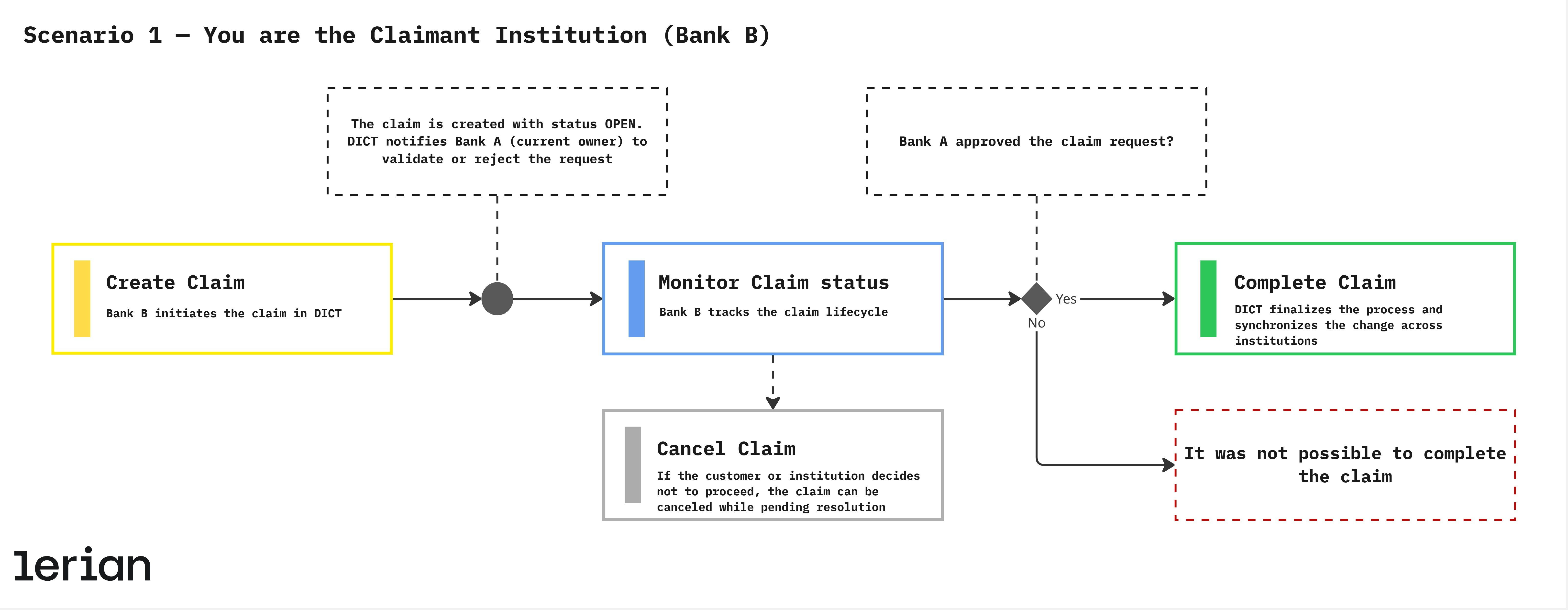
Scenario 1 — You are the Claimant Institution (Bank B)
In this case, the customer belongs to Bank B (you), which will receive the key. Bank B is responsible for creating, tracking, and (if necessary) canceling the claim. 1. Create Claim The customer requests a Pix key change — either transferring it from another institution or correcting its ownership. Bank B initiates the claim in DICT. Result:- The claim is created with status OPEN.
- DICT notifies Bank A (current owner) to validate or reject the request.
- For Portability, the key becomes inactive in Bank A and active in Bank B.
- For Ownership Claim, the key remains in the same institution but is reassigned to the legitimate owner.
Scenario 2 — You are the Current Institution (Bank A)
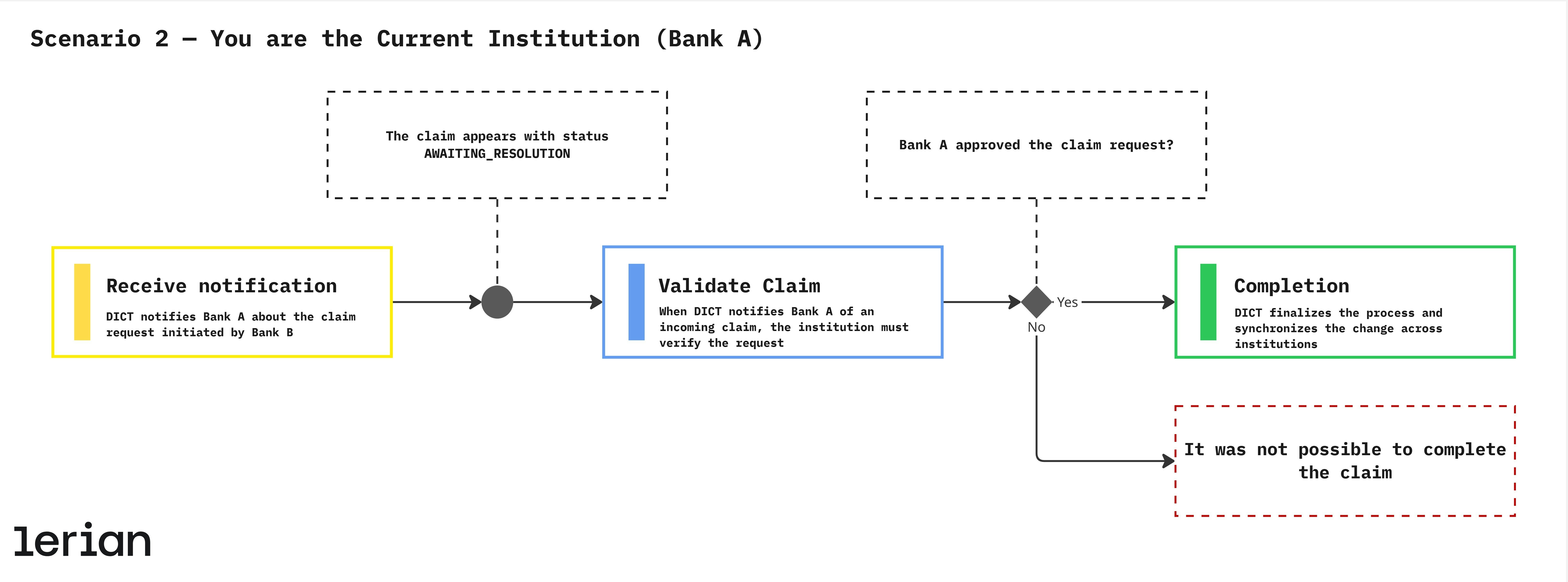
In this scenario, the customer belongs to Bank A (you), which currently holds the key being requested by another institution. Bank A must validate the claim request (Portability ou Ownership) received from DICT. 1. Receive notification DICT notifies Bank A about the claim request initiated by Bank B. The claim appears with status AWAITING_RESOLUTION. 2. Validate Claim When DICT notifies Bank A of an incoming claim, the institution must verify the request. Depending on the claim type, this step may require customer confirmation or document review. Result:- If approved → DICT transfers the key to Bank B.
- If denied → the claim status becomes CANCELLED.
- For Portability, the key becomes inactive in Bank A and active in Bank B.
- For Ownership Claim, the key remains in the same institution but is reassigned to the legitimate owner.
Security requirements (BACEN + Market Standards)
Institutions must enforce:
- End-to-end encryption of key data
- Rate limits for registration attempts
- Token expiration and one-time usage
- Strict validation of CPF/CNPJ, phone, and email
- Internal audit logs for all DICT operations
- Event tracking for confirmation, cancellation, and deletion
Synchronization & Reconciliation
DICT requires strong consistency between institutions and BACEN. Institutions must implement:
Periodic Sync
Pull updates for all keys associated with the institution.Event-Driven Sync
Listen to DICT notifications for:- Key activation
- Key deletion
- Claim creation/resolution
Conflict Resolution
If a mismatch is detected:- Institution must update its records
- Older or conflicting data must be replaced
- Audit logs must record the transition