

Types of Pix QR Codes
Pix defines two primary categories of QR Codes:
- Static QR Code → reusable, fixed structure
- Dynamic QR Code → generated per transaction, supports metadata, reconciliation, and expiration
Static QR Code
What it is
A reusable Pix QR Code that contains a fixed payload associated with a Pix key (email, phone, CPF/CNPJ, EVP). It does not expire, can be printed, shared, or displayed freely, and is ideal for simple or low-complexity payment scenarios.Characteristics
- Permanent and reusable
- Does not embed an amount by default (payer enters manually)
- Simplest form of Pix acceptance
- Works offline (printed, sticker, image)
- Fully compliant with EMV Pix static format
Typical use cases
- Street vendors, cafés, kiosks
- Professionals (delivery drivers, barbers, tutors, freelancers)
- Donation campaigns
- Single payment point shared by many payers
Static QR Code payment flow
- The merchant creates the QR Code once.
- The customer scans it using any Pix-enabled app.
- The user enters the amount manually.
- The payment follows the standard Pix processing flow: validation → SPI → credit.
- Settlement occurs instantly.
Benefits
- Easy to generate and deploy
- Reusable indefinitely
- Works well in physical environments
- No infrastructure needed
Limitations
- No automatic reconciliation
- The payer must type the amount → risk of incorrect value
- Cannot include detailed metadata (order ID, invoice, etc.)
Dynamic QR Codes
Dynamic QR Codes are generated per transaction and contain a structured payload with:
- predefined amount
- expiration time
- reconciliation identifiers
- metadata (order ID, description, payer details)
Dynamic (Immediate)
What it is
A one-time QR Code used for instant payments with:- a preset amount
- a short expiration window
- a unique transaction correlation ID
Ideal for
- E-commerce checkout
- Delivery apps
- POS systems
- Restaurants (per table/command)
Characteristics
- Strong metadata and reconciliation support
- Automatically expires
- Cannot be reused
- Real-time webhook confirmation
Pix Cobrança (Dynamic with Due Date)
What it is
A dynamic QR Code for payments with a due date, similar to an invoice. It supports:- due date
- interest and late fees
- discounts or abatements
- payer identification
Ideal for
- Schools and universities
- Condominium or association fees
- Subscription or recurring billing
- Professional invoices
Characteristics
- Contains full billing information
- Remains valid until expiration
- Reconciliation is automated based on the charge ID
Pix Automático (Recurrent)
Used to establish recurring collection authorizations. The QR Code serves as the initial consent request for periodic debits.
Ideal for
- Subscriptions
- Utility bills
- Monthly services
Pix Saque (Withdraw)
What it is
A QR Code that allows a customer to withdraw cash from an authorized merchant.Ideal for
- Retail stores offering ATM-like convenience
- Pharmacies, supermarkets, or convenience stores
Pix Troco (Change)
What it is
A QR Code used when the customer pays more than the purchase amount, receives the product, and gets the difference deposited as a Pix.Ideal for
- Supermarkets
- Gas stations
- Convenience stores
Payment flow (all QR types)
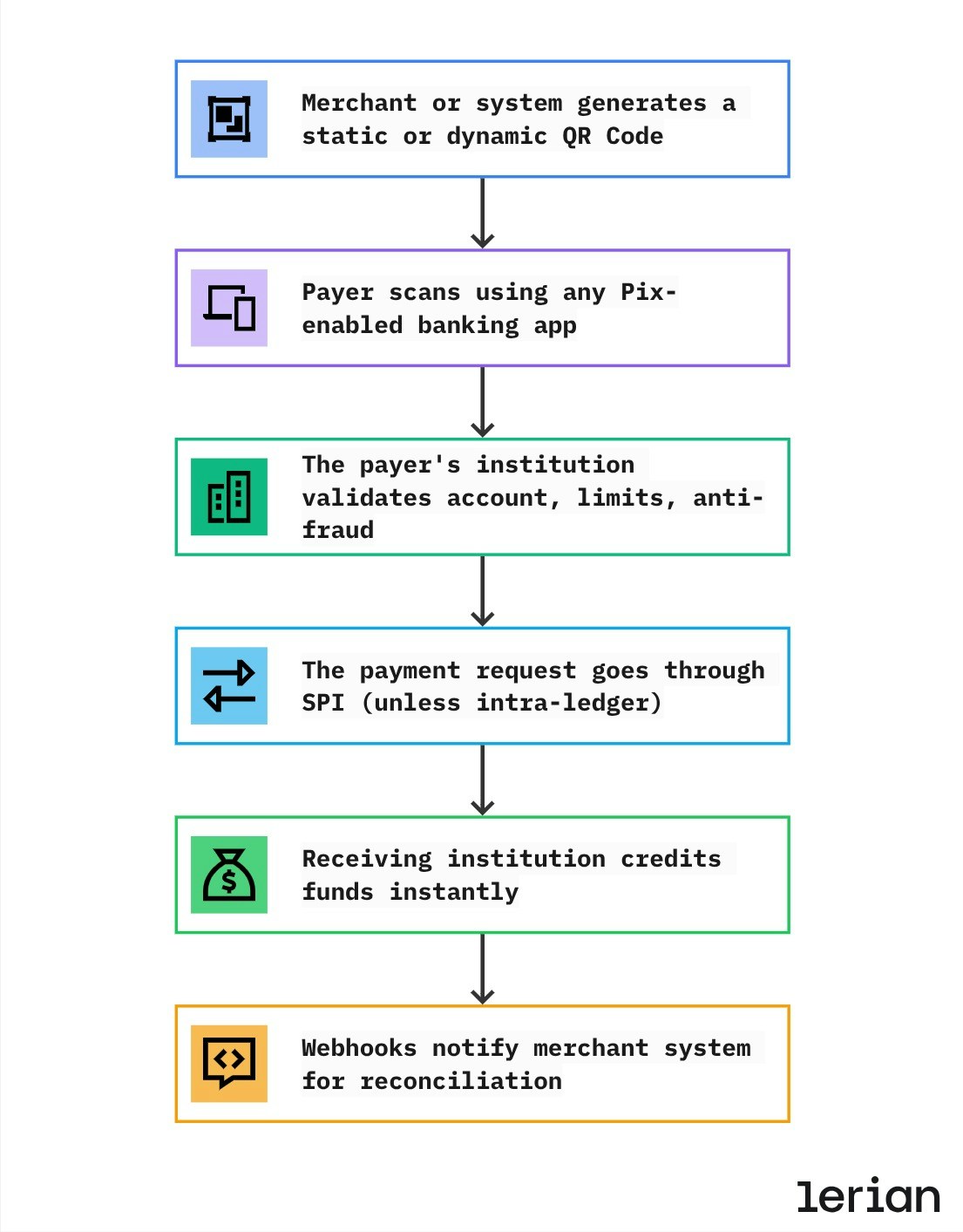
End-to-end Pix QR Code flow
- QR Code creation The merchant or system creates a Pix QR Code — either static (reusable) or dynamic (transaction-specific). For dynamic QR Codes, the payload may include predefined amount, expiration, and reconciliation identifiers.
- Payment initiation by the payer The payer scans the QR Code using any Pix-enabled banking or wallet application and reviews the payment details before confirming.
- Pre-transaction validation by the payer’s institution Before sending the payment, the payer’s institution performs mandatory validations, including account status, available balance, transaction limits, and internal risk checks.
- Settlement through the Pix infrastructure Once approved, the payment instruction is routed through BACEN’s SPI for real-time settlement. If both accounts belong to the same institution, the transaction may be settled internally without crossing the SPI.
- Instant credit to the receiving institution The receiving institution credits the funds to the beneficiary’s account immediately after settlement, completing the payment.
- Confirmation and reconciliation Webhook notifications are emitted to inform merchant or system backends about the payment result, enabling automatic reconciliation, order confirmation, and accounting updates.
Typical use cases
Static
- A bakery prints a single QR Code for the counter
- A barbershop shares its QR Code via WhatsApp
- A street vendor displays a laminated QR Code
Dynamic Immediate
- E-commerce checkout (one QR per order)
- Restaurants generating a code per table
- Delivery apps presenting a QR for each drop-off
Dynamic Due Date
- Schools generating a monthly QR Code invoice
- Condominium fees with interest/discount rules
- Freelancers issuing billed invoices
Withdraw / Change
- Market gives Loja Pix Saque
- Customer pays R 98 purchase and gets R$ 22 Pix Troco
Regulatory notes (BACEN)
Pix QR Codes must comply with:
- EMV® Merchant-Presented Mode (MPM) specification
- Pix “Iniciação por QR Code” rules
- Mandatory CRC validation
- Defined field structure for dynamic charges
- Expiration and billing rules for Cobrança (due-date QR)
- Transaction limits and night window (when applicable)