

When MED applies
A Pix transaction enters the MED process when a financial institution identifies the need for formal, regulated investigation, typically in cases such as:
- Fraud (phishing, account takeover, social engineering)
- Unauthorized transactions (user did not approve the payment)
- Operational errors (duplicate sends, incorrect recipient, wrong value)
- System or processing failures causing financial impact
Regulatory MED lifecycle
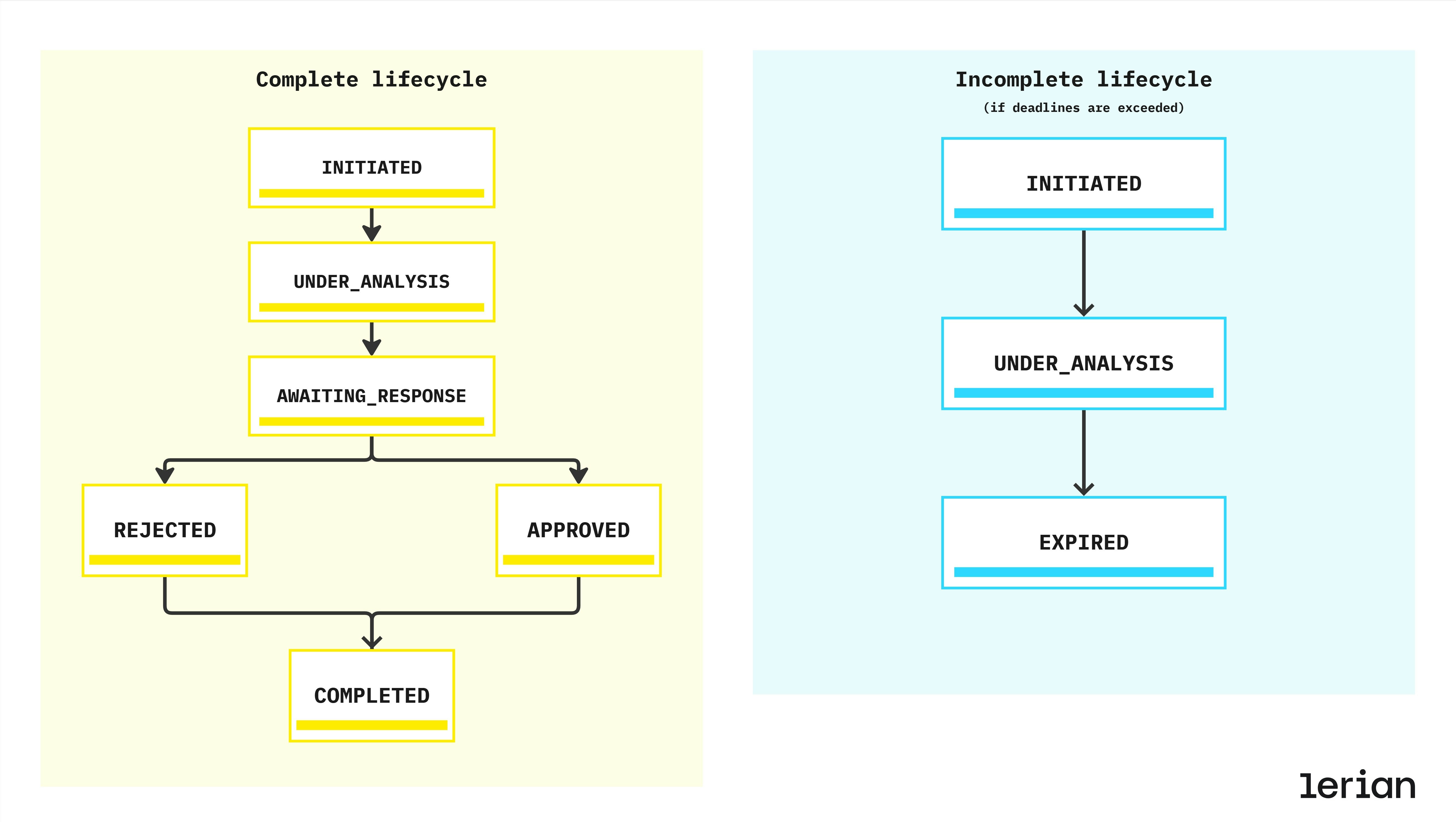
Every MED case follows a strict set of states defined by BACEN. Institutions must comply with the deadlines and response requirements at each stage.
Lifecycle overview
Valid reasons for MED disputes
A MED case must be opened under one of the regulated dispute categories:
| Code | Category | Examples |
|---|---|---|
| FRAUD | Fraudulent activity | Account takeover, scams, phishing |
| UNAUTHORIZED | Transaction executed without user consent | Stolen device, hijacked credentials |
| OPERATIONAL_ERROR | Execution mistake | Duplicate send, wrong recipient, incorrect amount |
| SYSTEM_ERROR | Technical fault | System malfunction, processing failure |
Possible outcomes
| Outcome | Result |
|---|---|
| APPROVE | Full refund must be processed |
| PARTIAL | Partial refund allowed (case-specific) |
| REJECT | No refund; case is closed |
| COMPLETE | Administrative closure after execution |
MED process — step-by-step flow
Below is the regulated MED process followed by all Pix institutions:
1. Validation
- Transaction exists and is in COMPLETED state
- Transaction age ≤ 30 days
- Minimum value R$ 1,00
- No existing open MED case for the same transaction
2. Evidence collection
- Fraud markers from DICT
- Internal risk analysis
- Upload of evidence (documents, screenshots, logs)
- Compliance verification
3. Case creation
- MED ID assigned
- Regulatory deadlines computed (7 / 10 days)
- Notifications sent to involved institutions
- Timeline and audit trail started
4. Analysis phase
- Examination of submitted evidence
- Evaluation of counterpart’s response
- Application of internal and regulatory rules
5. Decision
- Refund executed via pacs.004 (if approved)
- Ledger postings applied (debit/credit)
- Institutions notified
- All events logged for audit
6. Completion
- Case moves to COMPLETED, REJECTED, or EXPIRED
- 90-day retention period begins
- Evidence archived and audit trail locked
Integration points
Although MED is a regulatory process, it interacts with core Pix components:
| Component | Role |
|---|---|
| DICT | Provides fraud markers, key metadata, and ownership information |
| SPI (pacs.004) | Executes refund movements between institutions |
| Midaz Ledger | Applies debit/credit movements for approved cases |
| Pix Core Services | Coordinates lifecycle, deadlines, notifications, and SLA controls |
Compliance expectations
Institutions must ensure:
- Enforcement of all regulatory deadlines
- Cryptographic protection of evidence files
- Full audit trail including timestamps and event logs
- Standardized MED communication with counterpart institutions
- SLA monitoring and status tracking
- Consistent customer notification logic
- Proper use of dispute categories and reason codes
Relationship with refunds and reversals
While refunds and reversals are standard Pix operations, MED is the regulated mechanism used when:
- The refund is tied to fraud or unauthorized activity
- The originating institution disputes the transaction
- Additional evidence and regulated communication is required
Infraction reports
Infraction reports are the formal mechanism for a Pix participant to report suspected fraud or unauthorized activity associated with a transaction. They are the starting point of the MED dispute resolution process.
When to file an infraction report
An infraction report is filed by the payer’s PSP (the institution that initiated the original transaction) when a customer reports fraud or unauthorized activity. The report notifies the counterparty PSP (the receiver’s institution) and initiates the investigation. Two types of infraction reports exist:| Type | Filed by | Purpose |
|---|---|---|
REFUND_REQUEST | Payer’s PSP | Report fraud to request investigation and potential refund |
REFUND_CANCELLED | Payee’s PSP | Report a cancelled refund transaction |
Time limits and deadlines
Infraction reports operate under strict regulatory deadlines:| Rule | Time limit |
|---|---|
| Transaction age limit | Reports can only be filed for transactions within the last 80 days |
| Analysis period | The counterparty PSP has 7 calendar days to analyze and close the report |
| Refund request window | After closure with AGREED result, the reporting PSP has 72 hours to create a refund request |
| Fund release | If no refund request is created within 72 hours, blocked funds must be released |
Infraction report lifecycle
An infraction report progresses through the following statuses:| Status | Description |
|---|---|
OPEN | Report has been filed and is awaiting analysis |
ACKNOWLEDGED | Counterparty PSP has received and acknowledged the report |
CLOSED | Analysis complete — report is closed with a result (AGREED or DISAGREED) |
CANCELLED | Report cancelled by the reporting PSP (only from OPEN or ACKNOWLEDGED status) |
Closure and automatic fraud markers
When an infraction report is closed with anAGREED result, a fraud marker is automatically created for the affected individual. This links the infraction investigation directly to the anti-fraud system, ensuring that flagged individuals are tracked across the Pix ecosystem.
Available operations
- Create: File a new infraction report for a transaction
- List: Query infraction reports with filters (status, transaction, participant, analysis result)
- Retrieve: Get full details of a specific report
- Close: Submit the closure analysis with AGREED or DISAGREED result
- Cancel: Cancel a report that is no longer valid (only from OPEN or ACKNOWLEDGED status)
Refund requests
Refund requests are the mechanism for returning funds to the original sender after an infraction has been confirmed. They represent the financial execution step of the MED process.
When to create a refund request
Refund requests are created after an infraction report has been investigated and closed. The rules depend on the reason:| Reason | Prerequisite |
|---|---|
FRAUD | Requires a closed infraction report with AGREED result. Must be created within 72 hours of closure. |
OPERATIONAL_FLAW | No prior infraction report required. Used for processing errors or operational issues. |
Time limits
| Rule | Time limit |
|---|---|
| Transaction age | Refund requests must be created within 90 days of the original transaction |
| Post-infraction window | For FRAUD reason: within 72 hours after infraction closure |
| Monitoring period | For partial refunds or insufficient-balance rejections: monitor the account for up to 90 days from the original transaction and process additional partial refunds as funds become available |
Analysis outcomes
When the counterparty participant analyzes a refund request, three outcomes are possible:| Result | Description |
|---|---|
TOTALLY_ACCEPTED | Full refund approved and executed |
PARTIALLY_ACCEPTED | Partial refund approved (e.g., due to insufficient funds in the receiving account) |
REJECTED | Refund denied, with a rejection reason |
NO_BALANCE (insufficient funds), ACCOUNT_CLOSURE (account has been closed), INVALID_REQUEST (request does not meet requirements), or OTHER.
Available operations
- Create: Open a new refund request for a transaction
- List: Query refund requests with filters (status, transaction, participant, analysis result)
- Retrieve: Get full details of a specific request
- Close: Submit the closure decision with analysis result
- Cancel: Cancel a refund request before it is processed (only from OPEN status)
Fraud markers
Fraud markers flag individuals (by CPF/CNPJ) or specific Pix keys as associated with fraudulent activity. They are a central component of the Pix anti-fraud ecosystem managed through BACEN’s DICT.
How fraud markers are created
Fraud markers can be created in two ways:- Directly: A participant explicitly registers a fraud marker for a tax ID or Pix key through the API
- Automatically: When an infraction report is closed with an AGREED result, a fraud marker is automatically created for the affected individual
Fraud classification types
Each fraud marker is classified into one of the following types:| Type | Description |
|---|---|
APPLICATION_FRAUD | Identity theft or false application fraud |
MULE_ACCOUNT | Account used to receive and transfer illicit funds |
SCAMMER_ACCOUNT | Account actively used for scamming victims |
OTHER | Other types of fraud not covered by specific categories |
Fraud marker lifecycle
| Status | Description |
|---|---|
REGISTERED | Marker is active and visible in anti-fraud queries across the ecosystem |
CANCELLED | Marker has been cancelled and is no longer active |
Available operations
- Create: Register a new fraud marker for a tax ID and optionally a Pix key
- List: Query fraud markers with filters (key, document, status)
- Retrieve: Get full details of a specific marker
- Cancel: Cancel a previously registered marker (only from REGISTERED status)
Statistics and risk assessment
The MED statistics capabilities provide aggregated anti-fraud and transaction data for risk assessment. This data helps institutions evaluate the risk profile of a person or Pix key before processing a transaction.
What statistics are available
Statistics are available at two levels:Person statistics (by CPF/CNPJ)
Aggregated data for a specific individual or entity, including:- Settlement history: Number of settled transactions over different time periods
- Fraud markers: Counts by fraud type (application fraud, mule accounts, scammer accounts, other)
- Total fraud amounts: Monetary impact of fraud-related transactions
- Infraction reports: Open and rejected report counts
- Registered accounts: Number of accounts with Pix keys linked to this person
Key statistics (by Pix key)
Data for a specific Pix key, independent of its current owner, plus the current owner’s statistics:- Key-level data: Settlement history, fraud markers, infraction reports, and account registrations for the key itself
- Owner-level data: Full person statistics for the key’s current owner (same structure as person statistics)
Time periods
All statistics are aggregated over three time windows:| Period | Code | Description |
|---|---|---|
| 90 days | d90 | Recent activity — most relevant for active fraud detection |
| 12 months | m12 | Medium-term view of behavioral patterns |
| 60 months | m60 | Long-term historical context |
Use cases
- Pre-transaction risk scoring: Query destination key statistics before approving a cash-out to assess recipient risk
- Onboarding verification: Check person statistics during account opening or key registration
- Monitoring dashboards: Track fraud marker trends across your portfolio
- Regulatory compliance: Demonstrate due diligence in fraud prevention to auditors and regulators