

Key characteristics
Pix transactions share a common foundation across all institutions:
Instant settlement
Funds typically settle within 10 seconds, with SPI guaranteeing completion or timeout handled transparently.24/7 availability
Pix operates continuously — including weekends, holidays, and outside business hours.Irrevocability
Once a Pix is completed and credited, it cannot be reversed except through regulated flows (Refunds, Devoluções, MED).End-to-End ID (E2E)
Each Pix transaction receives a unique E2E identifier for auditability, reconciliation, and dispute handling.Interoperability
Any Pix participant can send or receive Pix from any other, independent of institution, platform, or channel.Configurable limits
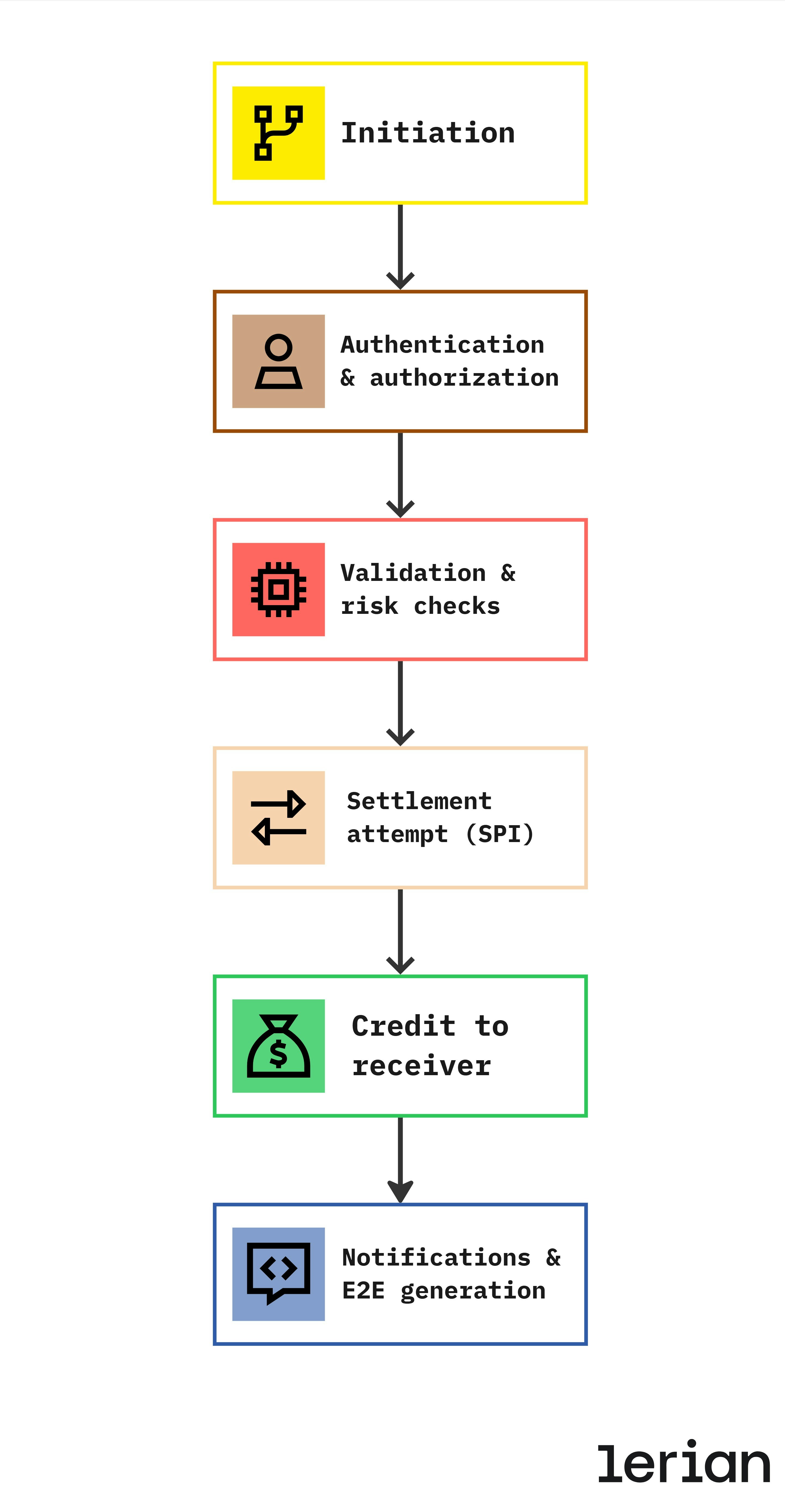
Institutions must enforce regulatory and internal limits for security and fraud control.How a Pix transaction works (End-to-End Flow)
-
Initiation
The user starts a Pix transfer using one of the available addressing methods:
- Pix key
- QR Code (static or dynamic)
- Manual bank details
- Copy-and-paste EMV code
To learn more about Pix QR codes, please visit the QR Codes documentation.
- Authentication & authorization The sending institution must authenticate the user with strong mechanisms (e.g., biometrics, 2FA, device trust). User consent is mandatory.
-
Validation & risk checks
Before sending anything to SPI, the institution must validate:
- Account condition (active, not blocked, KYC verified)
- Balance availability
- Limits (transaction, daily, nightly, monthly)
- Pix key validity (if applicable)
- Risk assessments (anti-fraud indicators, velocity checks)
-
Settlement attempt (SPI)
The institution submits the transfer to SPI (BACEN’s Instant Payment System), which:
- Validates the message
- Routes it to the receiving institution
- Settles the transaction between institutions
-
Credit to receiver
The receiving institution must credit the account immediately, even if:
- It occurs outside business hours
- Systems are under load
- Amount is high (except for flagged anti-fraud cases)
-
Notifications & E2E generation
- Both institutions receive the updated transaction status
- The transaction receives a unique E2E ID
- Webhooks or internal notifications update systems and users
Pix Transaction types
Pix transactions fall into a few standardized categories governed by BACEN.
1. Cash-Out (Send Pix)
The payer sends funds to another account using a Pix key, QR code, or bank details. Flow (summary):- User initiates transfer
- Institution checks balance + limits + key
- Transaction is sent to SPI
- Receiver credits instantly
- Both parties receive updates + E2E ID
- P2P transfers
- Merchant payments
- Bill splitting
- Marketplace split payments (when paired with Pix Cobrança)
2. Cash-In (Receive Pix)
The customer receives a Pix transfer from any other institution. Flow (summary):- Receiving institution is notified via SPI
- Account must be credited immediately
- Notifications are dispatched for reconciliation
- Transaction is recorded with E2E ID
- Salary or corporate disbursements
- Merchant settlements
- Recurring customer payments
3. Refund (Devolução)
Regulated flow that allows institutions to return funds to the original sender. Refunds may be triggered by:- Customer request
- Merchant refunds
- Duplicate payments
- Operational errors
- Fraud-related MED cases
- Use BACEN standard messaging
- Be linked to the original transaction
- Follow value and eligibility rules
4. Reversal (Chargeback / pacs.004)
Used in special regulated cases — often tied to MED or operational corrections. Reversals follow strict BACEN rules and are not the same as merchant refunds.Cash-out: two-phase transfer pattern
When a Pix cash-out is processed through the Lerian platform, the transfer follows a two-phase pattern that separates validation from fund movement. This design provides safety, compliance, and a better experience for both institutions and end users.
Why two phases
Executing a Pix transfer involves multiple validations: key lookup, account verification, balance checks, limit enforcement, and anti-fraud evaluation. Performing all of these in a single step creates risk — if something fails after partial execution, reversal becomes complex. The two-phase pattern solves this by splitting the process:- Phase 1 — Initiate: Validate everything without moving funds
- Phase 2 — Process: Execute the fund transfer using the validated data
- Validation before commitment: All checks (balance, limits, key validity, anti-fraud) happen before any money moves
- User confirmation: The initiating application can display validated destination details to the user before they confirm the transfer
- Idempotency support: Each phase can be retried independently without risk of duplicate transfers
- Compliance: Regulatory validations are completed and recorded before fund movement begins
How it works
Phase 1: Initiate
The initiation phase creates a transfer record by retrieving and validating destination information. No funds are moved at this stage. The platform supports three initiation types:| Type | Description | Input |
|---|---|---|
MANUAL | Full destination account details provided directly | Bank, branch, account number, document, name |
KEY | Destination resolved via Pix key lookup (DICT) | Pix key value (CPF, email, phone, EVP) |
QR_CODE | Destination extracted from a QR code payload | BR Code (EMV) string |
KEY and QR_CODE initiations, the platform automatically queries DICT to resolve the destination account, providing the initiating application with full details — account holder name, institution, and key ownership date — that can be displayed for user confirmation.
The initiation returns a unique identifier and an expiration timestamp. The application uses this identifier in the next phase.
Phase 2: Process
The process phase takes the validated initiation and executes the actual fund movement:- Verifies the initiation is still valid (not expired, not already processed)
- Debits the source account in the ledger
- Submits the payment to the Pix settlement infrastructure (SPI)
- Records the transfer with full traceability (end-to-end ID, timestamps, status)
Lifecycle summary
| Step | What happens | Funds moved? |
|---|---|---|
| Initiate | Validate destination, check key/QR, resolve account details | No |
| User confirms | Application displays details, user approves the transfer | No |
| Process | Debit source account, submit to SPI, credit destination | Yes |
| Complete | End-to-end ID assigned, both parties notified | — |
Intra-ledger Pix transactions
When both accounts belong to the same institution:
- The transfer does not pass through SPI
- The institution processes it internally
- E2E ID may still be assigned for traceability
- All standard validations apply (limits, fraud, balance)
Validation layers (Regulatory + Operational)
Every Pix transaction goes through multiple validations before being sent to SPI:
1. Account checks
- Account active
- Not blocked
- KYC complete
2. Funds availability
- Sufficient balance
- Temporary holds released
3. Pix key validation
If the user pays via key, the recipient’s details must be fetched from DICT and confirmed.4. Regulatory limits
- Per transaction
- Daily limit
- Nightly limit (mandatory)
5. Risk & fraud checks
Institutions may enforce:- Velocity checks
- Device fingerprinting
- Behavioral analytics
- Known-fraud markers
6. Idempotency
Each Pix transfer must have a unique transaction ID. This avoids duplicate transfers during retries.Operational controls and safety
Authentication requirements
Strong customer authentication is mandatory for all Pix send operations.Notifications & Webhooks
After crediting, institutions must notify systems and users. Webhooks allow real-time reconciliation.Error handling
Common error categories include:- Timeout
- Invalid key
- Insufficient funds
- Daily/nightly limit exceeded
- Suspicious transaction blocked
Auditability
Pix mandates full traceability:- Logs
- Timestamps
- E2E ID
- Account metadata
Transaction limits (BACEN Rules)
Pix transaction limits exist to reduce fraud risk, protect end users, and maintain operational safety across the instant payment ecosystem. BACEN defines minimum security standards, and institutions may add additional restrictions depending on their risk appetite. Pix limits are divided into mandatory regulatory limits and institution-defined limits.
1. Mandatory regulatory limits (BACEN)
Nighttime limit (Per-Transaction Cap)
Institutions must enforce a lower maximum limit between 20:00 and 06:00. Regulatory requirements:- Default maximum: R$ 1.000
- Institutions may set a lower default (e.g., R 200)
- Customers may reduce this limit instantly
- Customers may increase this limit only after a minimum wait of 24 hours
- Customers may adjust the nighttime window (e.g., extend to 18h–08h)
- Pix transfer (cash-out)
- Pix QR Code payment
- Pix Saque/Troco
- Pix Cobrança payments initiated at night
Allowance for Customer-Controlled limits
Institutions must offer customers the ability to configure their own limits, per:- Transaction
- Day
- Nighttime maximum
- Other forms of risk-based segmentation
- Reductions → must take effect immediately
- Increases → can only take effect after a minimum of 24 hours (security delay)
Obligation to analyze requests for limit increase
Every institution must:- Accept customer requests to increase limits
- Evaluate them through risk criteria
- Grant or deny based on fraud policy
- Apply increases only after the regulatory waiting period (24h+)
Saque/Troco limits (Cash-Out at merchants)
Pix Saque and Pix Troco have their own caps:- Default: R$ 500 per transaction
- Institutions may voluntarily offer up to R$ 3.000 per transaction
- Customers may reduce this limit instantly
- Increases follow the same 24h rule
Credit obligations (independent of limits)
Even if limits are exceeded, once a Pix is credited to the receiver:- The transaction becomes irrevocable
- Only MED or refund flows can reverse it
- Institutions cannot “undo” a completed Pix on their own initiative
2. Institution-defined limits (Configurable)
Beyond mandatory rules, institutions may add their own controls, such as:Per-Transaction limit
Maximum allowed amount for a single Pix operation.Daily limit
Cap on total Pix amount per user per calendar day.Monthly limit (optional)
Used mainly by corporate accounts or fintech risk models.Risk-based segmentation
Institutions may offer:- Stricter limits for new customers (ex.: first 7 days)
- Different limits for high-risk users or flagged accounts
- Dynamic limits adjusted by customer behavior
3. Operational rules required by BACEN
Immediate limit reduction
Customers can lower their limits instantly.Delayed limit increase
All increases must respect:- 24 hours minimum before becoming effective
- Optional additional waiting period (institution’s choice)
Peak risk hours
Nighttime limits apply specifically to cash-out flows, as they represent the main vector for fraud losses.Real-time enforcement
Institutions must check limits before sending a transaction to SPI. A Pix that violates limits must be rejected locally, not after reaching SPI.4. Limit behavior in transaction lifecycle
During a Pix initiation
The sending institution must verify:- Available balance
- Transaction limit
- Daily limit
- Nighttime limit
- Saque/Troco limit (if applicable)
- Fraud/velocity limits
- Customer-configured limits
During retries
Limits must be validated again. Idempotency prevents duplicate transfers but does not bypass limit checks.During merchant flows
Dynamic QR Codes must also respect:- Customer limits
- Time-of-day rules
- Saque/Troco caps
5. Recommended customer communication
BACEN requires institutions to:- Explain limits clearly
- Offer customer self-service to adjust limits
- Show pending increases and activation dates
- Notify customers in case of suspicious behavior
6. Summary table
| Limit Type | Mandatory? | Default (BACEN) | Customer Controls | Activation Rules |
|---|
| Limit Type | Mandatory? | Default (BACEN) | Customer Controls | Activation Rules |
|---|---|---|---|---|
| Per-transaction | Optional | Institution-defined | Increase/reduce | Reduce = immediate / Increase = 24h |
| Daily | Optional | Institution-defined | Increase/reduce | Reduce = immediate / Increase = 24h |
| Nighttime (20h–06h) | Yes | Max R$ 1.000 | Customer customizable | Increase = 24h delay |
| Saque/Troco | Yes | R$ 500 default | Customer configurable | Increase = 24h delay |
| Monthly | Optional | Institution-defined | Increase/reduce | Institution-defined |